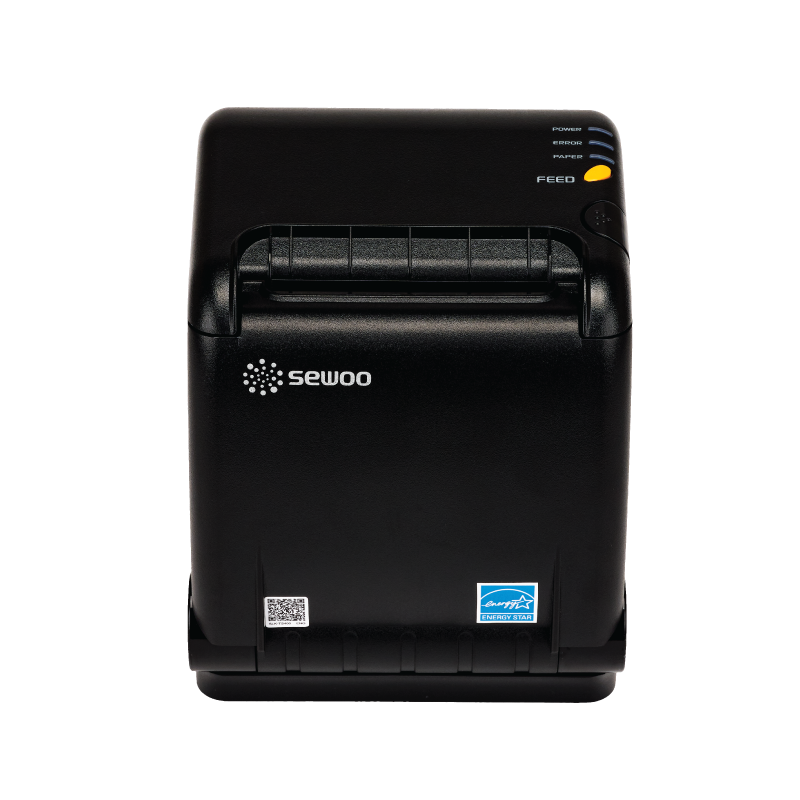
사용 환경 및 기존에 사용중인 프린터 사용 가능 여부 확인
- 이미 POS 가 설치된 컴류터라면 윈도우 10 이상이 설치되어 있어야 합니다.
- 컴퓨터에 Printer-Server 가 설치 되어야 합니다. 이 파일은 아래의 Download Print-Server File 을 클릭하여 다운 받으시면 됩니다
- Ethernet print 로서 ECS/POS 가 가능한 POS Printer 가 컴퓨터에 연결 되어야 합니다. 요즈음의 프린터는 거의 ECS/POS 가 가능한데, 오래된 모델은 지원이 되지 않을수 있습니다.
- 컴퓨터 또는 POS 컴퓨터에서 menuoneca.com/backoffice/merchant/ 에서 merchant login 이 되어 있어야 합니다. 로그인 정보가 필요하신분은 연락 바랍니다.
- 현재 POS 와 프린터를 사용하고 있다면, 컴퓨터에 프린타 모듈을 설치한후 테스트 하면 현재의 프린터를 사용 가능한지 확인이 가능 합니다.
준비 사항: 아래의 것을 준비 한 후 연락을 주시면 자세한 안내 드립니다.
- Download Print-Server File 이 파일을 사용하고자 하는 포스컴퓨터에 저장 합니다. 추후에 찾기 쉽게 폴더를 Print-Server 라고 만든후 저장하는것이 좋습니다.
- Ethernet POS Printer IP address 확인: 프린터의 Feed 버튼을 누른채 프린터의 전원을 켜면 IP Address 를 알 수 있다.
- 포스 컴퓨터에서 menuoneca.com/backoffice/merchant/ 에 접속하여 이미 알려드린 로그인 정보에 의해 로그인 합니다.
- Download 하여 저장한 파일을 Extract 합니다.
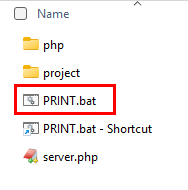
- 그리고 파일이름 PRINT.bat 파일을 클릭하여 아래와 같은 화면이 컴퓨터에 나오는지 확인 한다.
-
이 화면이 보인다는것은 주문 내용이 프린터에 인쇄가 가능함을 알려 주는 것입니다.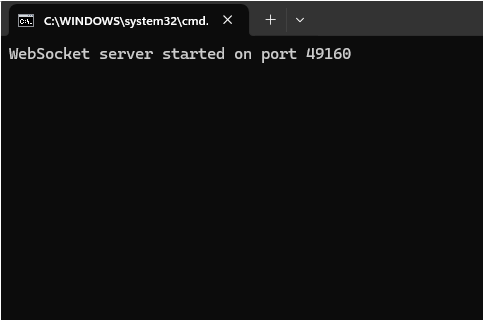
- 이제 주문 내용을 프린트 해 봅니다.
자세한 내용은 연락 주시면 안내 해 드립니다.
Checking System Requirements and Printer Compatibility
-
If a POS system is already installed, the computer must be running Windows 10 or later.
-
A Printer Module must be installed on the computer.
-
An Ethernet printer that supports ESC/POS commands must be connected to the computer. (Most modern POS printers support ESC/POS, but older models may not be compatible.)
-
The computer or POS terminal must be logged in with a merchant account.
-
If you are already using a POS system with a printer, you can install the Printer Module on the computer and run a test to confirm whether your existing printer is compatible.
For more details or assistance, please contact us.
